


Most phishing websites are little more than static copies of login pages for popular online destinations, and they are often quickly taken down by anti-abuse activists and security firms. But a stealthy new phishing-as-a-service offering lets customers sidestep both of these pitfalls: It uses cleverly disguised links to load the target brand’s real website, and then acts as a relay between the victim and the legitimate site — forwarding the victim’s username, password and multi-factor authentication (MFA) code to the legitimate site and returning its responses.
There are countless phishing kits that would-be scammers can use to get started, but successfully wielding them requires some modicum of skill in configuring servers, domain names, certificates, proxy services, and other repetitive tech drudgery. Enter Starkiller, a new phishing service that dynamically loads a live copy of the real login page and records everything the user types, proxying the data from the legitimate site back to the victim.
According to an analysis of Starkiller by the security firm Abnormal AI, the service lets customers select a brand to impersonate (e.g., Apple, Facebook, Google, Microsoft et. al.) and generates a deceptive URL that visually mimics the legitimate domain while routing traffic through the attacker’s infrastructure.
For example, a phishing link targeting Microsoft customers appears as “login.microsoft.com@[malicious/shortened URL here].” The “@” sign in the link trick is an oldie but goodie, because everything before the “@” in a URL is considered username data, and the real landing page is what comes after the “@” sign. Here’s what it looks like in the target’s browser:

Image: Abnormal AI. The actual malicious landing page is blurred out in this picture, but we can see it ends in .ru. The service also offers the ability to insert links from different URL-shortening services.
Once Starkiller customers select the URL to be phished, the service spins up a Docker container running a headless Chrome browser instance that loads the real login page, Abnormal found.
“The container then acts as a man-in-the-middle reverse proxy, forwarding the end user’s inputs to the legitimate site and returning the site’s responses,” Abnormal researchers Callie Baron and Piotr Wojtyla wrote in a blog post on Thursday. “Every keystroke, form submission, and session token passes through attacker-controlled infrastructure and is logged along the way.”
Starkiller in effect offers cybercriminals real-time session monitoring, allowing them to live-stream the target’s screen as they interact with the phishing page, the researchers said.
“The platform also includes keylogger capture for every keystroke, cookie and session token theft for direct account takeover, geo-tracking of targets, and automated Telegram alerts when new credentials come in,” they wrote. “Campaign analytics round out the operator experience with visit counts, conversion rates, and performance graphs—the same kind of metrics dashboard a legitimate SaaS [software-as-a-service] platform would offer.”
Abnormal said the service also deftly intercepts and relays the victim’s MFA credentials, since the recipient who clicks the link is actually authenticating with the real site through a proxy, and any authentication tokens submitted are then forwarded to the legitimate service in real time.
“The attacker captures the resulting session cookies and tokens, giving them authenticated access to the account,” the researchers wrote. “When attackers relay the entire authentication flow in real time, MFA protections can be effectively neutralized despite functioning exactly as designed.”
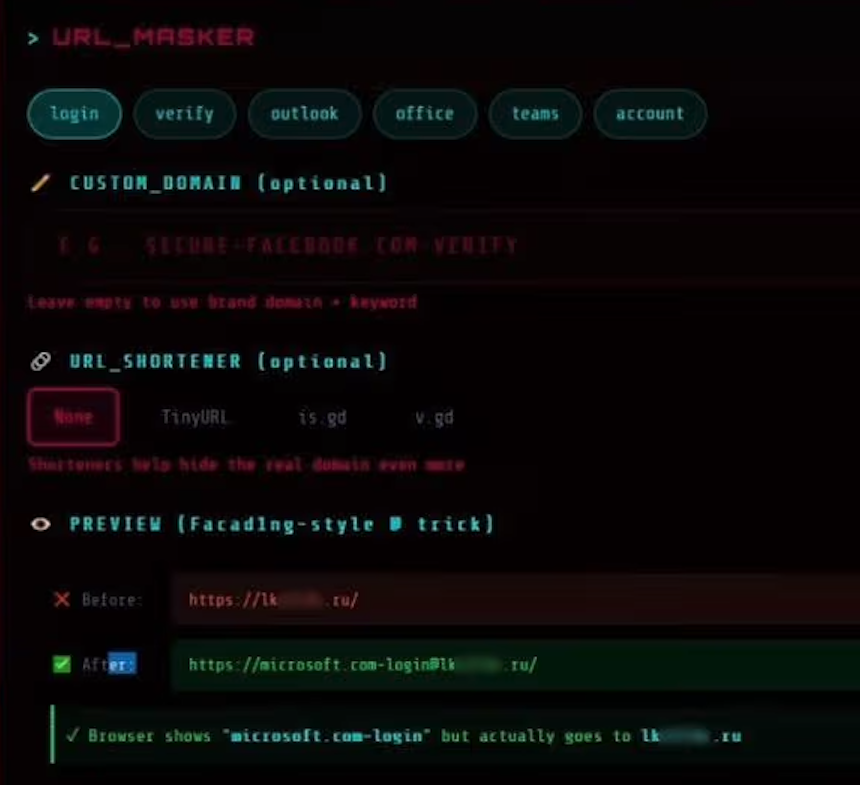
The “URL Masker” feature of the Starkiller phishing service features options for configuring the malicious link. Image: Abnormal.
Starkiller is just one of several cybercrime services offered by a threat group calling itself Jinkusu, which maintains an active user forum where customers can discuss techniques, request features and troubleshoot deployments. One a-la-carte feature will harvest email addresses and contact information from compromised sessions, and advises the data can be used to build target lists for follow-on phishing campaigns.
This service strikes me as a remarkable evolution in phishing, and its apparent success is likely to be copied by other enterprising cybercriminals (assuming the service performs as well as it claims). After all, phishing users this way avoids the upfront costs and constant hassles associated with juggling multiple phishing domains, and it throws a wrench in traditional phishing detection methods like domain blocklisting and static page analysis.
It also massively lowers the barrier to entry for novice cybercriminals, Abnormal researchers observed.
“Starkiller represents a significant escalation in phishing infrastructure, reflecting a broader trend toward commoditized, enterprise-style cybercrime tooling,” their report concludes. “Combined with URL masking, session hijacking, and MFA bypass, it gives low-skill cybercriminals access to attack capabilities that were previously out of reach.”

Looks like Ai slop lol.
This article raises the question of which controls could effectively prevent such phishing attempts.
To me, the fault lies with the web browser. The scam looks like this
https://goodcompany.com@badguys.com
I tested the browsers below on Windows 11 and all went to badguys.com *without* a warning about the format of the link:
Brave version 1.87.190 (Feb 19, 2026)
Chrome v144
Edge version 145
Firefox version 147
Mullvad version 15.0.6 (based on Firefox)
LibreWolf version 147.0.4-1 (based on Firefox)
Vivaldi version 7.8.3925.73
They really should put out a warning.
But then that gets forwarded to goodcompany.com from an unusual IP address than a user normally logs in from. Kind of like if one is using a VPN. A good banking app will flag that, as will several logins like Gmail, etc. On modern browsers, though, this is a feature, not a bug.
> I tested the browsers below on Windows 11 and all went to badguys.com *without* a warning about the format of the link:
I just did the same test (using FF 52 and DDG), and got a clear warning about supplying log-in credentials where the website did not ask for any.
My guess is that your FF does still have the check, but the MITM site simple requests the credentials, and than just discards them.
I could imagine a “never allow credentials in an URL” (disallow an “@” in the domainname ) setting for it though (in About Config?).
Security plugins could do that, browser doing that by default would be a step more.
Why not install flawedbot? You’ll be right.
“get a shotgun!”
-Sleepy
It’s always been the rightmost part of URL that you look at.
It’s displaying a ‘correct’ URL from the position of route-able.
You’re asking for any URL with @ to have a pop-up warning,
I think that might make email annoying, but I see your point.
On my Win 11 laptop, both Chrome and Brave (Chromium browsers) resolve to badguys.com, but the site cannot be reached. OTOH, Firefox shows the entire https://goodcompany.com@badguys.com/ but again, the site does not load.
I have the Malwarbytes Browser Guard on all browsers, in case that matters
Following up, shortly after Firefox showed the entire https://goodcompany.com@badguys.com/ in the address bar, it then redirected (?) to simply badguys.com. Did not connect to the site in any occasion, though
I agree. Clearly you need to be more specific instead of fucking po’ing my identity to share, dude!
No new controls seem necessary, since the target is still being sent to a fake domain. The only thing “new” here is the attack is via a web proxy. I’m honestly surprised this wasn’t already more common, since doing a MITM on traffic is *so* much simpler than making and hosting mocked up sites.
Phishing resistant MFA, as always.
The only solution is to totally lock down all systems including mobile systems and place all control in the hands of true experts who understand the deepest internals of their respective OSes, and prevent things like git from being IPOed
I do not understand the deeper technicalities of how this works, but I know enough to trace email and hosts of domains and redirect links. However I wish I could get an understanding of why major ISP like Microsoft, Google, Amazon and various lesser ISP cannot make a dent in criminal and other spam. I give below a simple example of phishing spam that I receive daily. A few dozen a day. Mainly from Microsoft but with domains hosted by Microsoft and Amazon and DigitalOcean in this case. I have reported hundreds, but they continue to send and host and seem to ignore reports. You say:
“Most phishing websites are little more than static copies of login pages for
popular online destinations, and they are often quickly taken down by
anti-abuse activists and security firms. ”
Mine are not being taken down. I report hundreds of these to Microsoft
“Your 250 GB Professional Plan has expired and the automated cleanup sequence has reached its final phase. All photos, videos, and professional documents stored in your vault will be erased within the hour.”
They do nothing.
The domains are typically:
httx://vijifrbmbe.edbtraining.com[.]au redirecting to
httpx://logadsys-mmm-098331.sfo3.digitaloceanspaces[.]com/
The former is hosted by Microsoft who sent it, and sends a similar daily. The edbtraining is hosted by Amazon who does nothing and the redirect is to Digitalocean who reply with a link to a form they have for submitting reports, as if one has time for that dozens of times per day. I have filled out their form and they say they acted, but they are too stupid to do anything about the same one tomorrow.
Do you have any advice on why the major internet companies do nothing?
Also, why are the spammers you list in your article not taken down immediatly?
> However I wish I could get an understanding of why major ISP like Microsoft, Google, Amazon and various lesser ISP cannot make a dent in criminal and other spam.
Oh, they *can*, but they *choose* not to because the abusers are the ones giving them money. Worse, they actually double dip by selling victims extra “protection” services. Do you really think Google doesn’t have enough LLM training data from Gmail to eliminate *all* spam, sent or received? Same for all the other big players.
> I report hundreds of these…
Why would you waste your time with even one report? You will continue to be ignored unless you take some action they can feel in their pockets. Personally, I suggest simply removing them from the equation (abusive IPs go into the firewall, untrusted contacts get disposable email address, etc.). Do something more than just complain.
I’ve seen overlays on a real site that were grabbing credentials with only a tiny border around it to give away that it was an overlay. Is this similar technology? Sorry if thats a dumb question…. just that after reading this I don’t sense a good solution based on cyber criminals using AI. At least malwarebytes was able to catch the overlay issue I saw.
Not a dumb question.
The trick they are using is a server side security issue, though. The responding server application(s) should have the smarts to know that there should be no traffic from strange places, like .ru, .sg, etc., for given accounts. How often does apple.com get logins for an account coming from a Singapore IP address if the account holder lives in Holy Oak, TX?
It’s not that simple.
As Krebs has often mentioned, illegitimate residential US IPs are available to the miscreants.
And legitimate users log in with a VPN or on vacation from other countries.
So, it would inconvenience or shut out the real people, while having minimal impact on the true threats.
Well there has to be a process to find out right? You can’t just deny because it’s off-pattern and call it good.
That’s a whitelist.
Creating a process as we speak and adding it to my TTD list with my TBN and my SBN
If you use a password manager such as Bitwarden, which puts in credentials automatically, you still are safe. Bitwarden is triggered only on the correct URL, so on a phishing site it will do exactly nothing. That should be a red flag for the user. Of course you have to refrain from manually inputting any credentials! Once you have stored all of them in Bitwarden, that is.
Christoph Schmees, pc-fluesterer.info
What I would love to see would be a browser that would only permit connections to a white listed set of web sites with the whitelist being input only by user and not automagically.
I’d like to see this also on e-mail.
For what it’s worth, on my e-mail, for financial institutions I have very strange looking e-mail addresses (e.g. tb99e3.a8e47e.b08023.a3198d@example.com) that are only given to one financial institution. On any incoming e-mail purporting to be from that financial institution, if it is to the e-mail address specifically used by that institution, then it is labeled with the name of the institution. If I receive an e-mail purporting to be from that financial institution, but sent to any other address, it gets a label of “WARNING” instead.
before this there was chrome in kiosk mode + web vnc phishing, which may sound enticing but doesn’t feel very responsive and so the illusion may fade away rather quickly
Question (and excuse me if this is dumb since I’m not a techie). Call me paranoid but no matter how often I visit any website that requires ID credentials, I take the time to verify the site’s certificate (on FF for example by clicking on the lock symbol, more information then view certificate). Only after I verify a valid URL and certificate do I enter sensitive information. My question is whether Starkiller would circumvent that check. In other words, will the certificate inquiry stillo return a valid one if Starkiller is meddling?
You’re good, to the extent that you’re “techie” enough to parse the info you see. For the example given in the article, it’d be a cert for whatever `.ru` domain was acting as the proxy. If you can work out the actual domain from the URL itself, you don’t *really* need to also go check the cert, since the browser does that itself. There’s certainly no harm in doing that for a link you find questionable, but then I’d say people should **stop clicking questionable links** in the first place!
Since Starkiller for my understanding only acts as a MITM proxy, you will be presented by certificate of the attackers website.
That certificate will show up as valid (locked/green symbol) but for the website/CN = badguys.com for example.
At this point you should get alarmed and recognize, that it is not your valid microsoft, google or whatever login page.
But how many people check for the CN in the SAN in the certificates of the websites they visit. They might check for the lock/green or red symbols, but if the certificate is valid for the attackers website than there is not hint for the not so tech aware people.
If the evil proxy site has a valid certificate, you’ll see the valid certificate that site. Which will be a different certificate from the site you’re trying to access, but both will be valid, so it is not immediately obvious. If the evil proxy has no valid certificate, you’ll see it doesn’t have one.
Exactly, many will see ‘valid cert’ for unknown rando domain and accept it anyway.
Only people who are awake notice ‘hey, that’s not where I wanted to go.. wtf is this’
– of those who even look. Not obvious to average joe, and busy joe won’t even look.
This depends on how stupid your vendor is.
Consider https://rbc.com
Their Certificate has:
Subject Alt Name:
DNS Name: rbcroyalbank.com
DNS Name: http://www.rbcroyalbank.com
DNS Name: akmstg-mgw2.rbcroyalbank.com
DNS Name: akmstg-mobile.rbcroyalbank.com
DNS Name: apps.royalbank.com
DNS Name: caribbean-gcc.rbcroyalbank.com
DNS Name: caribbean-scc.rbcroyalbank.com
DNS Name: caribbean.rbcroyalbank.com
DNS Name: cpa.rbc.com
DNS Name: ec.rbcnetbank.com
DNS Name: fonds.rbcgma.com
DNS Name: funds.rbcgam.com
DNS Name: groupadvantage.rbc.com
DNS Name: homeportal.rbc.com
DNS Name: i1.rbcinsightbeta.rbc.com
DNS Name: i2.rbcinsightbeta.rbc.com
DNS Name: lu.rbcgam.com
DNS Name: media.rbcgam.com
DNS Name: media.rbcgma.com
DNS Name: mgw2.rbcroyalbank.com
DNS Name: mgw6.rbcroyalbank.com
DNS Name: portfolioanalytics.rbcgam.com
DNS Name: rbc.com
DNS Name: rbcassurances.com
DNS Name: rbcbank.com
DNS Name: rbcbankusa.com
DNS Name: rbcbanqueroyale.com
DNS Name: rbcdirectinvesting.com
DNS Name: rbcinsightbeta.rbc.com
DNS Name: rbcinsurance.com
DNS Name: rbcplacementsendirect.com
DNS Name: rbcrewards.com
DNS Name: rbcrtdes.rbcroyalbank.com
DNS Name: rbtt.com
DNS Name: rcapleasing.com
DNS Name: s001gw.rbcroyalbank.com
DNS Name: sgw02.royalbank.com
DNS Name: sgw04.rbcroyalbank.com
DNS Name: silver.docs.rbcwealthmanagement.com
DNS Name: silver.rbcbank.com
DNS Name: sso01g.rbcroyalbank.com
DNS Name: sso01s.rbcroyalbank.com
DNS Name: sso10.rbcroyalbank.com
DNS Name: ssprmus.rbc.com
DNS Name: tt.rbcnetbank.com
DNS Name: workplaceretention.rbc.com
DNS Name: http://www.mondialprotect.com
DNS Name: http://www.rbc.com
DNS Name: http://www.rbcassurances.com
DNS Name: http://www.rbcbank.com
DNS Name: http://www.rbcbanknextgen.com
DNS Name: http://www.rbcbankusa.com
DNS Name: http://www.rbcbanqueroyale.com
DNS Name: http://www.rbcdirectinvesting.com
DNS Name: http://www.rbcdx.com
DNS Name: http://www.rbcfinancialplanning.com
DNS Name: http://www.rbcgestiondepatrimoine.com
DNS Name: http://www.rbcgfs.com
DNS Name: http://www.rbcgma.com
DNS Name: http://www.rbcinsightbeta.rbc.com
DNS Name: http://www.rbcinsightresearch.com
DNS Name: http://www.rbcinsurance.com
DNS Name: http://www.rbcinvestments.com
DNS Name: http://www.rbcnotes.com
DNS Name: http://www.rbcphnic.com
DNS Name: http://www.rbcplacementsendirect.com
DNS Name: http://www.rbcrecompenses.com
DNS Name: http://www.rbcrewards.com
DNS Name: http://www.rbcsfc.com
DNS Name: http://www.rbctravelprotection.com
DNS Name: http://www.rbcusnotes.com
DNS Name: http://www.rbcvisainfinite.com
DNS Name: http://www.rbcwm-usa.com
DNS Name: http://www.rbtt.com
DNS Name: http://www.rcapleasing.com
DNS Name: http://www.visainfiniterbc.com
DNS Name: http://www.worldprotect.com
DNS Name: www1.eapps.rbcinsurance.com
DNS Name: www2.rbcinsurance.com
DNS Name: www4.rbcinsurance.com
DNS Name: www6.royalbank.com
That’s a huge list of random domains.
If you’re used to a huge list of random domains and the phisher produces a Cert with a similar (but slightly different) set of domains, would you be able to tell that it’s the right set? (This isn’t your fault, it’s RBC’s)
What you’re doing isn’t wrong, but it really relies on your vendor not being stupid (which is asking a lot) and not encouraging bad practices (which again is asking a lot).
Using bookmarks and setting your browser to autofill credentials (linked by domain) is also helpful.
Passkeys are more or less the solution for this problem as they only work with the right domain and not lookalikes.
https://passkeys.2fa.directory/us/#banking is not particularly promising.
https://passkeys.2fa.directory/us/#payments at least has a handful of deployments.
This isn’t new. Stuff like this has been done since at least 2010.
Source of that?
Evilginx has been around since 2017, and there were undoubtedly man-in-the-middle frameworks prior to that.
Do hardware security tokens protect against the MFA token forwarding described here?
Yes, the main benefit of hardware tokens and passkeys is that the site is verified.
In the vast majority of cases, the computer/browser in a phishing attempt is not compromised. Compromised meaning some unauthorized code from the phisher is somehow running. Most of the time, the browser is just showing the phisher’s site as a web browser is expected to.
With an uncompromised computer/browser, the hardware token or passkey only authenticate directly to the site (such as google.com) as authenticated by the https certificate.
I will give a disclaimer that the token is not a panacea, depending on the account recovery mechanism. But whatever the alternative mechanism, the phisher cannot target the normal login flow of a hardware key is used.
Yes, because they cryptographically bind the authentication to the actual domain origin of the legitimate site.
The caveat to that being; some older keys that rely on OTP’s being entered manually, would be at risk. Based on Brian’s article, this vector appears targeted at relayable MFA methods, not origin-bound hardware challenges.
Fascinating hypothesis.
‘Token codes are easily stolen, because no mutual-authentication exists (anything that can steal a password can also steal a token code).
‘
https://en.wikipedia.org/wiki/RSA_SecurID#Theoretical_vulnerabilities
Explain/extrapolate for people whose minds just went blank reading that.
And who is burning toast?
My comment was originally destined as a disclaimer to my own reply/comment to Bob’s question above, about hardware security tokens. The original statement was quite verbose and upon editing it and replacing it with the above, it ended up here by itself and out of context.
My point was; Yes, hardware security tokens from current generation keys will protect against these AiTM attacks due to their cryptographic binding to the domain of origin. But, and here’s the caveat, some early generation keys are not. Think older RSA SecurID and OTP keys that utilised relayable MFA methods i.e codes or tokens that could be proxied. They would fail to protect in this scenario.
Yes, I know they’re archaic, but aren’t we all. Now leave me alone, I must answer the front door. I think the Fire Dept’s just arrived. Pffft … burning toast my arse.
Done with nginx since at least as early as 2011, yes.
excellent explanation, all I wanted.
Oi mealy, got any of those extra polates just lying around? I’m all out. DM me.
This seems to be similar to attacks using evil proxies like Evilginx. They have been around for a couple of years and been very effective. Also loads of phishing services being offered, although this one stands out from the dashboard i must say. We have been researching this type of threat (AitM) and published a trend report last year, which i will share in the website field.
We built a free detection mechanism that can be installed into a M365 tenant and works by embedding a canarytoken image through CSS. This is the source of the findings in our report and the website provides a simple setup as well.
On second thought this is not a aitm style attack but more like a browser in the browser. There are similarities but in terms of proxying works completely different. So the CSS trick will probably fail to work. here.
Hi Brian,
Thanks for the good report.
We should all be vigilant when browsing, clicking on links, and logging in to secure websites. Using the Authentication app or hardware key will help with safer login. Catching the bad guys is no easy task. These are challenges where user education is important. Pointing a finger at the ISP will not help. I know Microsoft and Google have security strike teams that are monitoring these activities. They cannot be a police officer standing next to you every time you are surfing the web. We ourself has to do our part TO KNOW and AVOID. Can you catch them? It’s not easy, even if you are pro.
Here is my take:
Broswer plugin or extensions are often the main culprit that hackers target, but often we love plugins because they give us convenient access to doing many things. If possible, avoid them.
Use the Authentication app using rolling code and/or Hardware key to minimize your risk. They are app are free and good, but the hardware key will cost you.
Check every link before clicking. If someone gives you a link to your bank, do not use it. Open another browser tab, type in yourself (spell correctly) to go directly to your bank website directly.
Use Security tools with anti-phishing or monitoring capabilities.
Disable JavaScript if possible; these are often how fake windows are created.
After reading the comments:
Searching for the major ISPs will show who they are. Guess what, they are not Microsoft, Google, or Amazon.
A certificate can be fake, or they can just buy one too.
White list and Black list functions are in all the browsers.
Brian, it looks like the ability to subscribe to your mailing list has been temporarily suspended??